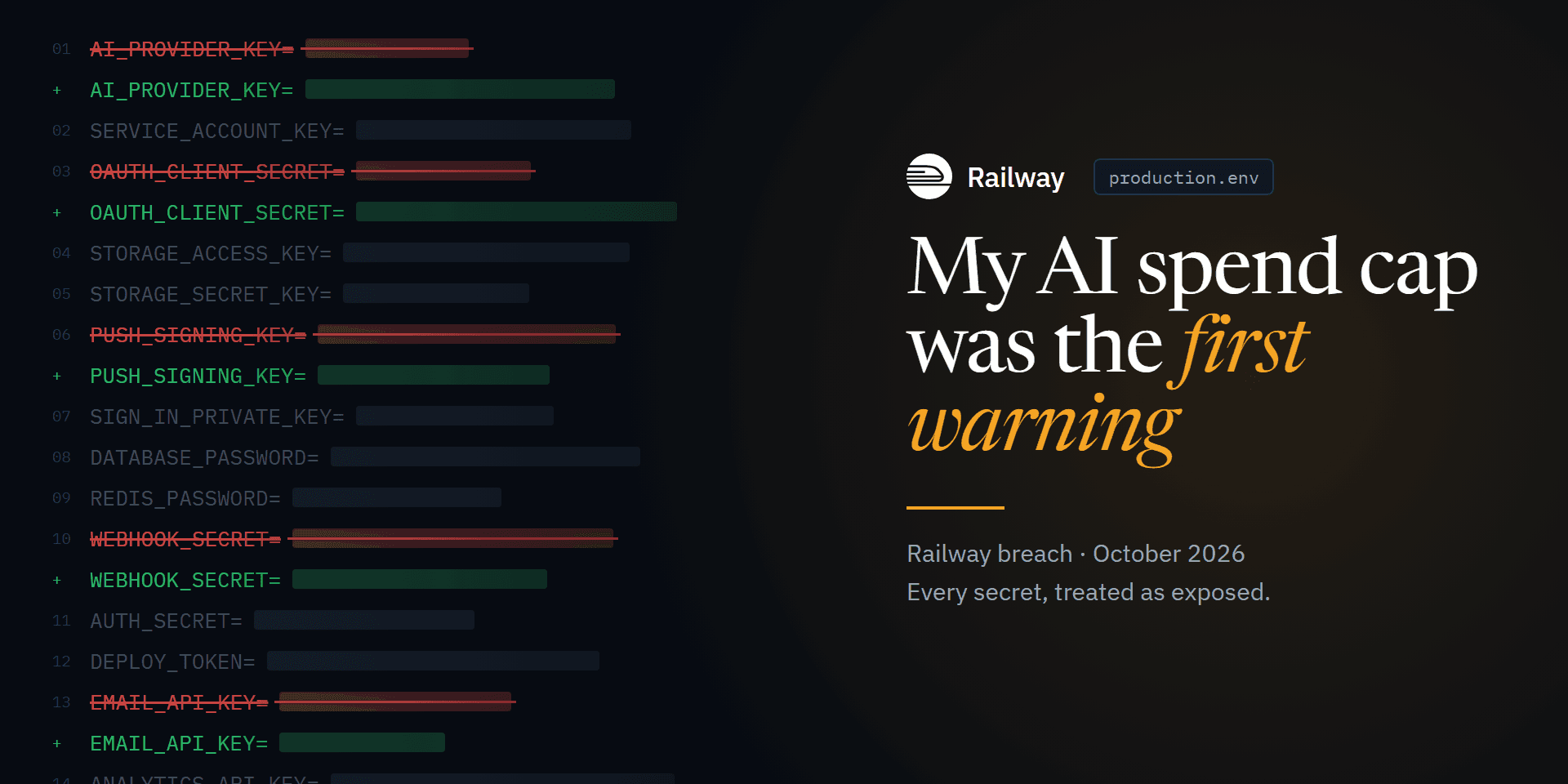
At 6:26 pm on Wednesday 21 October, Google AI Studio emailed me: my Gemini API service had been paused because the project had reached its spend cap.
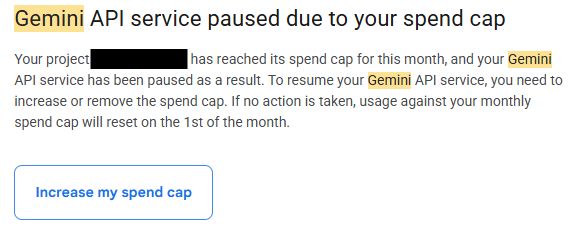
The cap is deliberately low, so it would catch exactly this kind of thing. On its own, hitting it didn't prove anything: development work, a tuning session I'd forgotten about or a chart combining several keys could all explain extra usage. But I don't leave a production key live while it's being used in ways I can't explain, so I revoked it straight away.
By the following morning, I had rotated credentials across my production applications hosted on Railway. The spending cap had been the first visible sign of the Railway security incident.
I'm a senior cyber security analyst, so investigating suspicious activity is my day job. This time it was my own production applications. I'm keeping them anonymous. What I want to record is the sequence: what I could see, what I couldn't establish, and how much work sits behind "rotate your secrets".
In short:
- A Gemini spend cap fired almost five hours before Railway's public disclosure. It was my first sign of the breach.
- I assumed Railway was breached the moment I noticed reports online, and was rotating keys 18 minutes later, before the disclosure went up.
- The attacker only wanted AI keys. Railway's report later said the aim was distillation: harvesting frontier-model output at other people's expense.
- With deployments paused, rotating meant choosing between doing it twice and holding fresh secrets somewhere safe.
- Don't let "rotated" be a single tick box. Revoked, saved, installed and verified are four different things to check.
The usage didn't match the application
At about 7 pm, I started investigating.
The application only requests a lightweight text model and an embedding model. The usage dashboard showed others, including Pro, image generation and text-to-speech. None of those appear anywhere in the code. Filtering the usage chart to the application's key still showed them.
Looking at that key raised more questions:
- It had no application restrictions. It was limited to the Gemini API, but anyone holding it could use it from anywhere.
- It wasn't my other keys. I have other keys outside production, so I checked those first. None of them matched the key the traffic came from.
- Request logging was switched off. That was deliberate: request logging stores prompts and responses, and I didn't want my users' data sitting in a provider's logs. The trade-off was that there was no record of who had made the calls, or from where. I've since turned on limited logging, which gives me something to investigate with next time, but it recovers nothing from the past.
Accounting for my own testing
Before blaming anyone else, I went back through my own recent development work.
There had been legitimate live testing. A couple of days earlier, I'd been tuning an AI feature and making live calls to the lightweight model while I iterated. That explained some extra traffic. It didn't explain Pro, image generation or text-to-speech.
That distinction kept the investigation honest. I had evidence that needed explaining, I'd accounted for part of it, and the rest was still unattributed. A leaked key was a hypothesis, not a finding.
People were saying their AI had been drained
At about 10:50 pm, I noticed people on X and Discord saying their AI provider balances had been drained, with suspicion pointing at Railway. That changed the question from "what's wrong with my key?" to "what else is exposed?"
From that moment, I assumed Railway was breached. It was chatter, not confirmation, but waiting for confirmation wasn't worth the risk. I spent about fifteen minutes on fast triage for anything worse than stolen keys: sign-ins and admin changes, OAuth grants, data exports, and login history on the connected services. Nothing showed an account takeover, but that didn't clear anything. A copied API key can be used without anyone signing in to anything.
Railway's status page said it was invalidating sessions. My CLI login had already been invalidated.
Treating everything as breached
I didn't need proof that Railway was compromised to act as if it was. By 11:08 pm, I'd started rotating keys. At 11:26 pm, I inventoried every credential name stored on Railway and built a rotation checklist, treating all of it as breached.
That was a decision about how to respond under uncertainty. It wasn't a claim that every secret had been accessed.
The inventory covered every service across my production applications: third-party API keys, service-account keys, push notification and sign-in keys, storage keys, deployment tokens, database passwords, and the applications' own signing secrets. Several credentials were used by more than one service.
The checklist recorded variable names and the services using them, never the values. I worked through one application at a time, ticking items off in my notes.
Then Railway published its disclosure
Railway had published its security disclosure at about 11:10 pm, two minutes after I'd started rotating keys. I hadn't seen it when I decided to treat everything as breached. I read it shortly after midnight.
Railway said an unauthorised party may have accessed stored customer environment variables and obtained some decrypted contents. It recommended rotating secrets and private registry credentials. Deployments were paused.
The same notice reached my inbox at 12:44 am, nearly two hours after I'd assumed a breach.
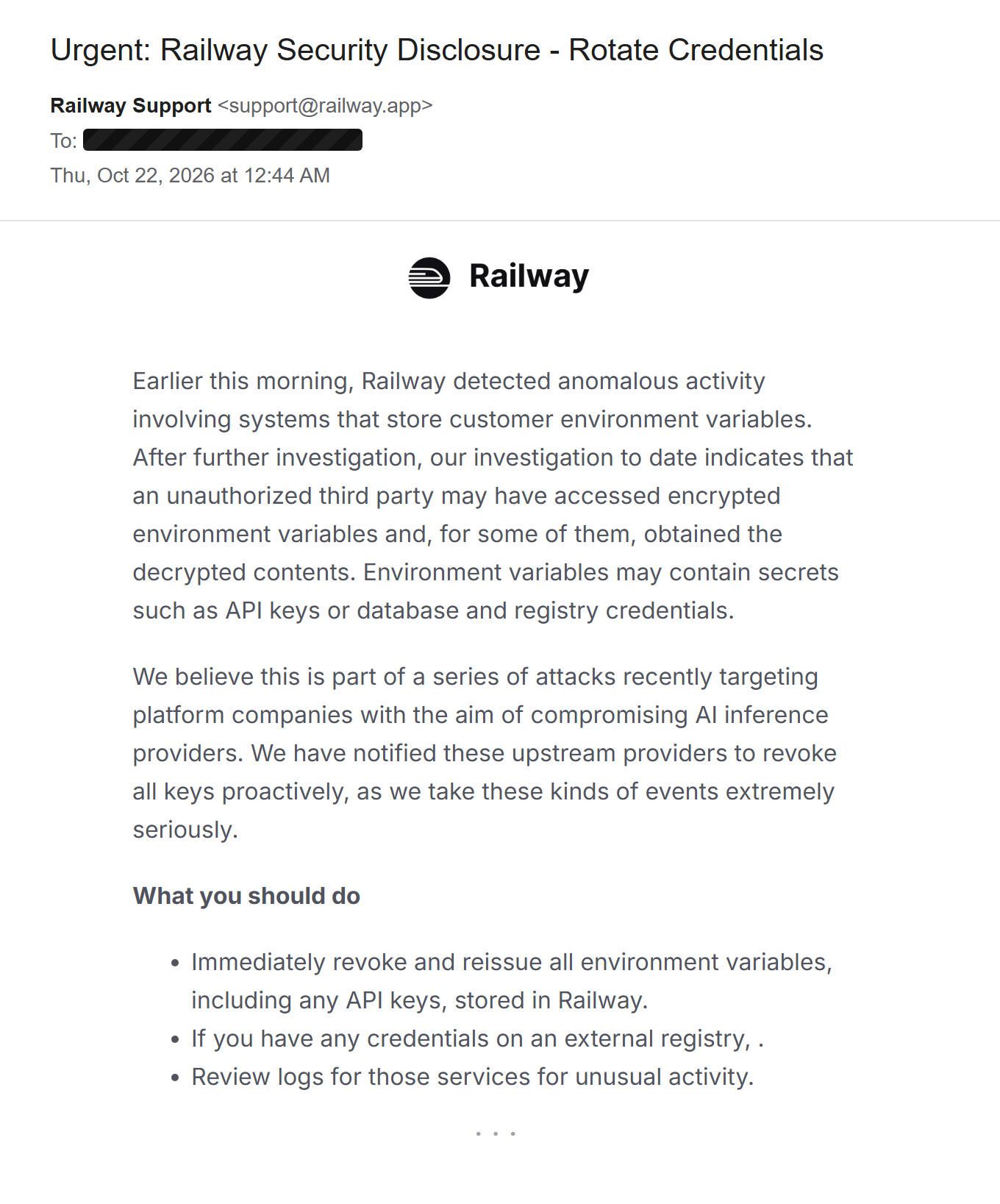
That made my earlier decision look a lot less cautious. It still didn't settle the cause of my Gemini traffic. Exposure through Railway was now a plausible explanation, but nothing I had tied those specific requests to it.
Rotating while nothing could be deployed
The hard part was that Railway was recommending rotation while deployments were paused.
I could revoke a credential at its provider straight away. I couldn't get its replacement into a running service. So every revocation was a trade-off: leave a possibly exposed credential live, or break whatever depended on it until deployments came back.
I chose to revoke, and that meant taking my services offline entirely. With so many credentials revoked at once, there was no useful version of the applications left running. A half-working service would have failed in confusing ways for the people using it, so it was better for it to be clearly down than quietly broken. They stayed offline until I could deploy the replacements.
I worked through the providers one at a time into the early hours. The awkward part was what to do with the replacements. With deployments paused, there was nowhere to put them, which left two options, neither of them good:
- Rotate without keeping a copy. Revoke the old credential, discard the new one, and rotate again once deployments return. The exposed key is dead immediately, at the cost of doing the work twice. Some providers only show a new secret once, so discarding it really is final.
- Store the replacements until they can be deployed. That makes recovery faster, but a collection of freshly issued production secrets is a risk in its own right unless it's stored and handled properly.
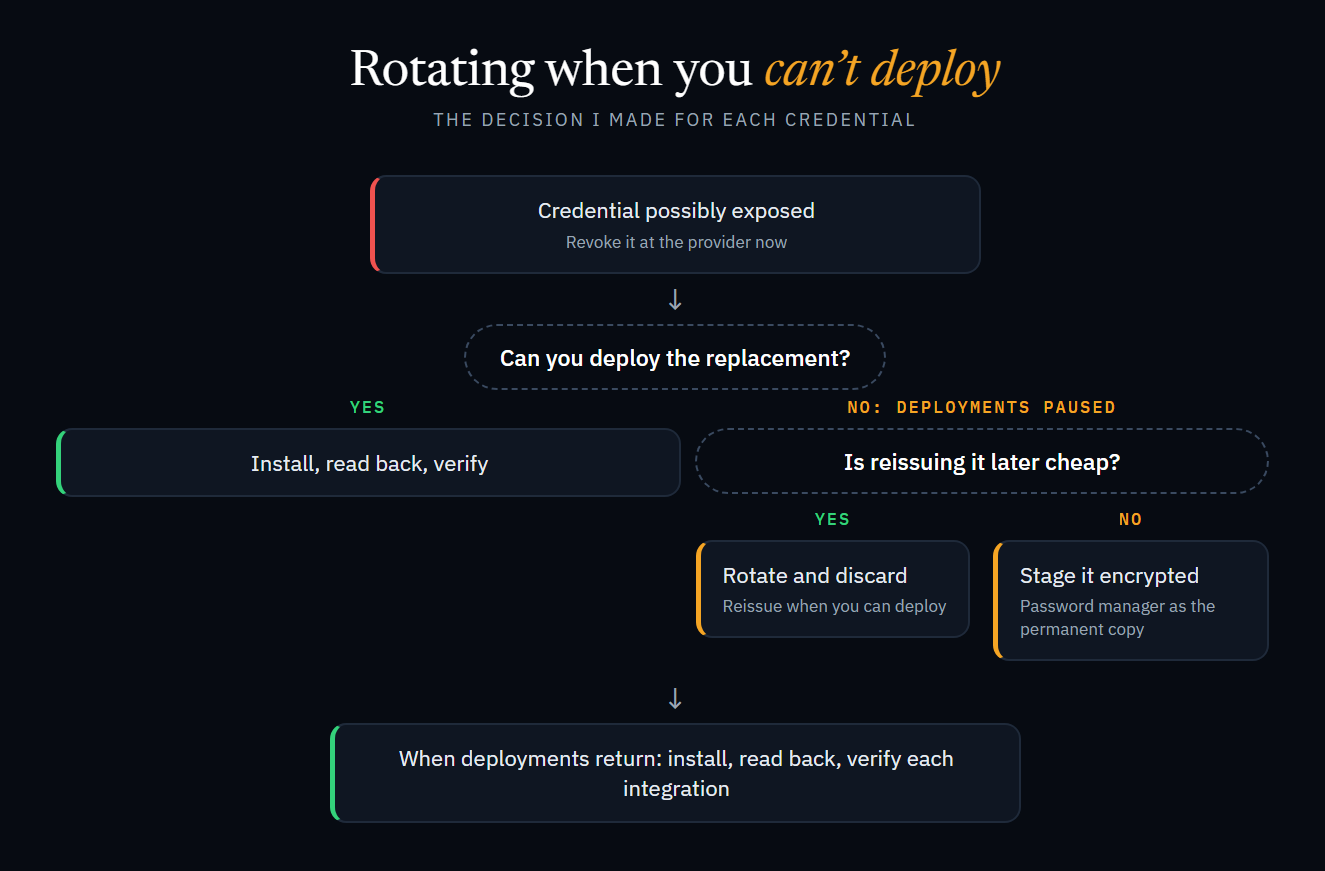
I used both. Where reissuing later was cheap, I rotated and let the new value go. For the rest, replacements went into an encrypted local staging file, tied to my user account, with my password manager as the permanent copy. A password manager with a command-line tool, like Proton Pass CLI, makes that easier to script without secrets passing through your clipboard. I also prepared an upload script that saved variables to Railway without triggering deployments, so everything was ready the moment the platform recovered.
When deployments came back
Railway invalidated all API tokens overnight, including ones I had already rotated. When deployments returned the next morning, I uploaded the staged credentials with deployments skipped, and read each value back to compare it before redeploying anything. Even that caught something: the stored copy of one private key had lost its final newline. It was still the same key, but a strict comparison flagged it.
I didn't treat a running service as a recovered one. I tested each integration by actually using it, because a health check passing doesn't tell you that sign-in, push notifications or webhooks work. Some credentials also lived in more than one place: push notification keys, for example, had to be updated with the build service as well as Railway.
One last surprise: rotating the Gemini key didn't lift the spending cap. The cap belongs to the Google project, not the key.
Why only the AI key?
The rest of the picture came together over the following days.
During the rotation, I'd also gone through the usage and activity logs of every other service whose credentials were stored on Railway, looking for calls I didn't recognise. I found nothing unusual.
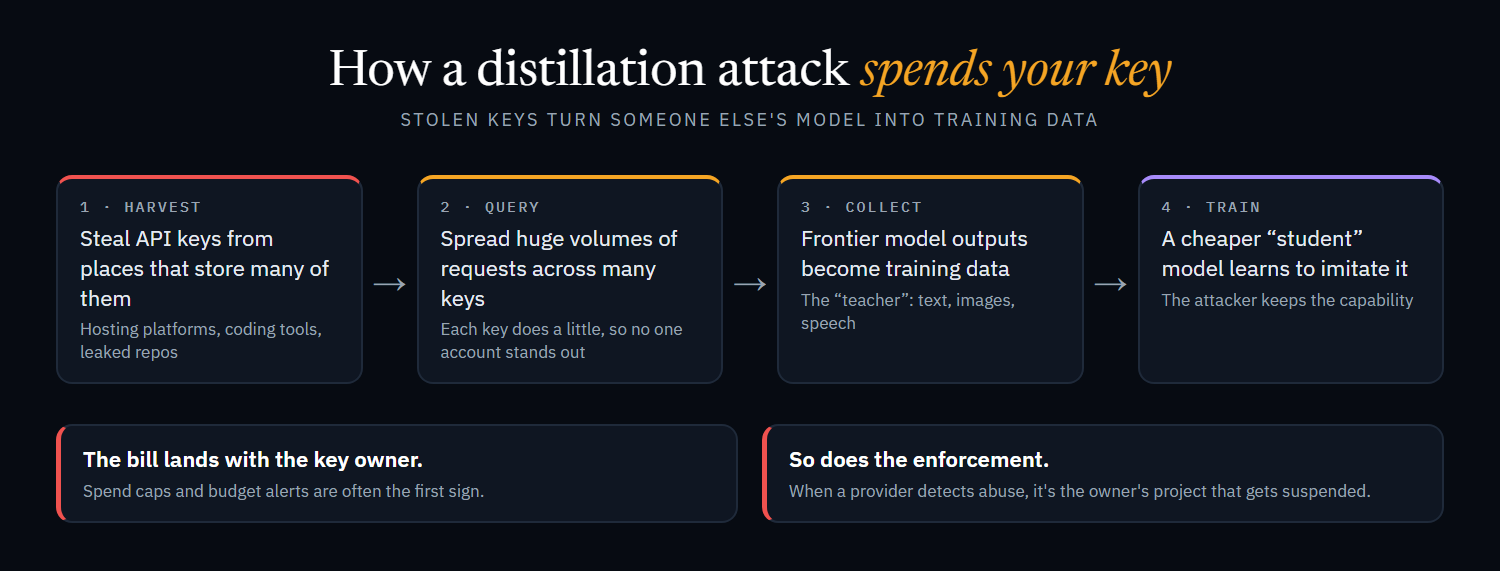
The pattern was telling, though. The AI key had been drained, and I could see no sign of any of my other keys being used. Someone after data or money would have had more valuable targets in the same environments. Someone who only wanted AI keys, and burned through them calling the most capable models available, looked more like they were harvesting model output. My suspicion that night was distillation: using other people's keys to generate large volumes of responses from frontier models, to train a model of their own.
What is a distillation attack?
Distillation is a standard machine learning technique. You train a smaller "student" model on the outputs of a larger "teacher" model, so the student learns to imitate it at a fraction of the cost. With a model you own, or under terms that allow it, that's routine.
It becomes an attack when the teacher is someone else's frontier model, queried at scale without permission. Providers' terms generally forbid using outputs to train competing models, and they monitor for, rate-limit and ban accounts that look like they're harvesting. Stolen API keys get around all of that:
- Someone else pays. Generating millions of high-quality responses is expensive. On a stolen key, the bill lands with the victim.
- The traffic is spread out. Thousands of keys each doing a little look less like one harvesting operation than a single account doing everything.
- Enforcement hits the victim. When a provider detects abuse, it's the key owner's project that gets suspended.
- Access controls follow the key, not the attacker. A key issued to a customer in a supported region works from wherever it isn't restricted.
That fit what I saw. The attacker showed no interest in my data. They wanted output, specifically from the most capable models, across text, image and speech. The useful question wasn't "what did they take?" but "whose compute did they spend?"
Railway's preliminary report, published on 23 October, supported that suspicion. Railway said early investigations indicated the attack was "attempting to obtain AI provider API keys to perform distillation attacks". It also explained that some providers had revoked keys as a precaution, beyond those known to be affected. A provider-wide incident can explain why you act without answering every question about your own systems.
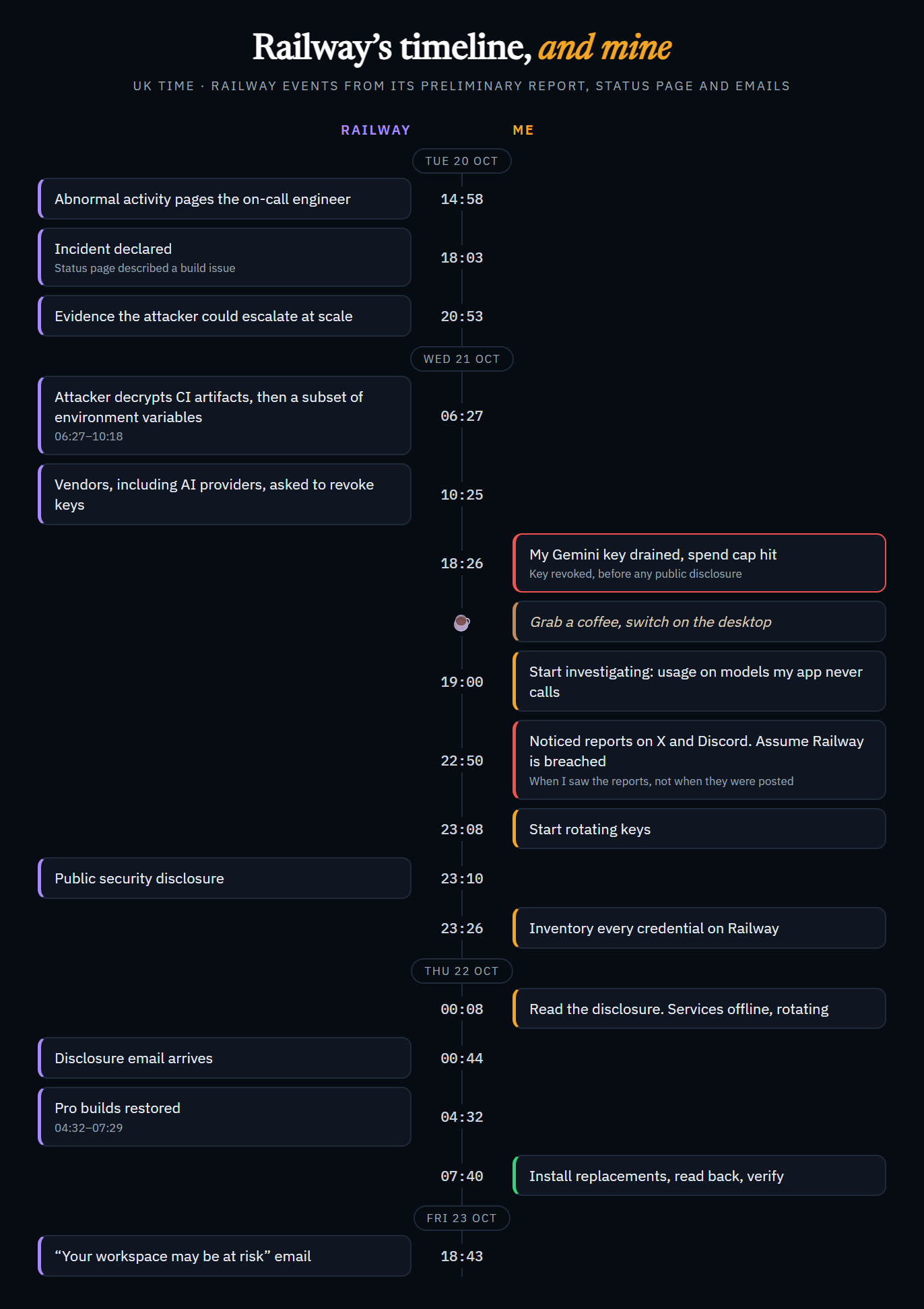
The report's timeline was the most striking part. Railway first saw abnormal activity on the afternoon of 20 October. By the morning of 21 October, the attacker had decrypted a subset of environment variables, and at 10:25 am Railway asked vendors, including AI providers, to revoke keys. My spend cap fired eight hours after that, and the public disclosure came nearly five hours after that. For most of a day, the only signal I had was my own usage dashboard.
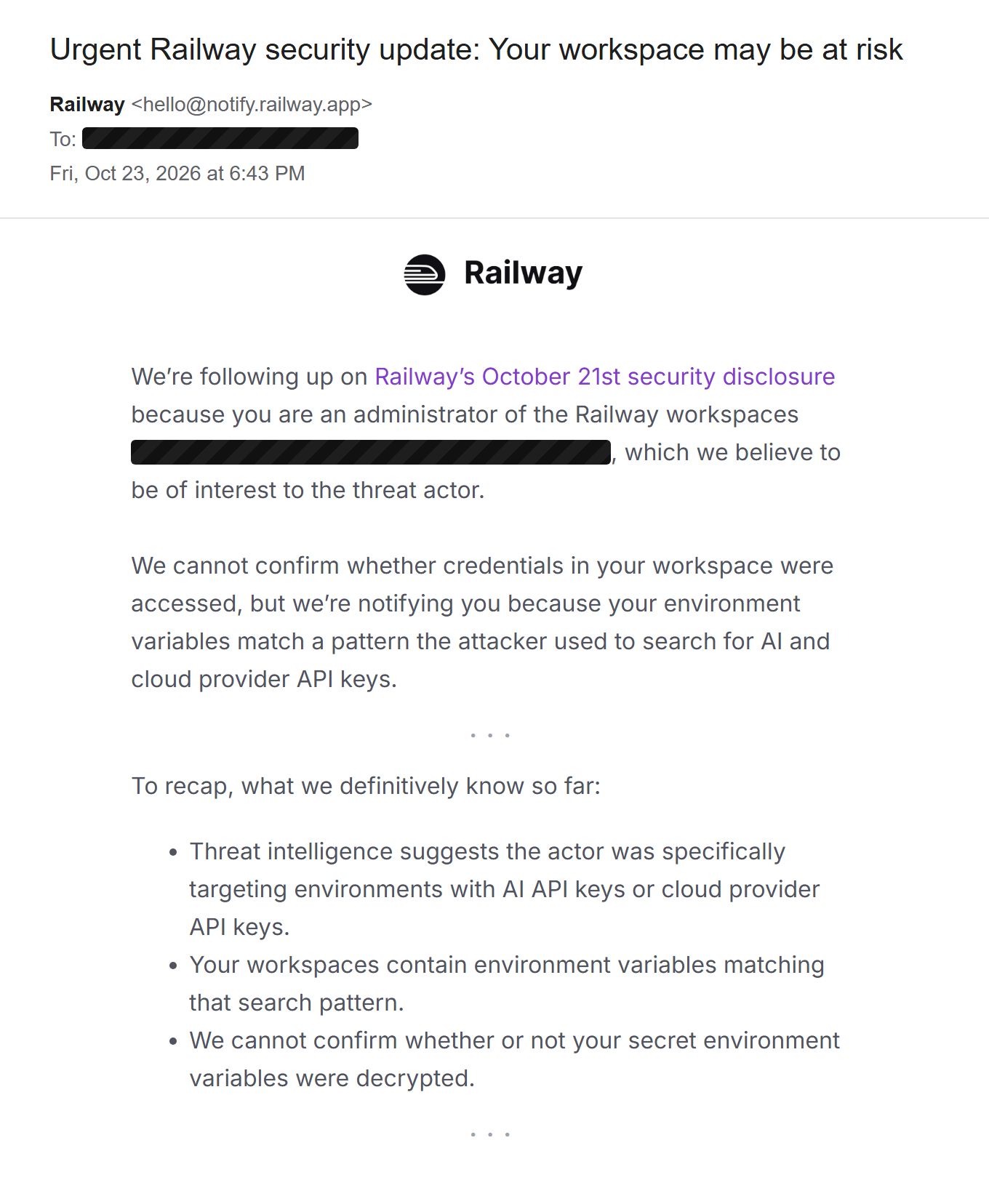
Two days after the disclosure, Railway emailed me directly: the workspaces holding my production applications were "of interest to the threat actor", because their environment variables matched the pattern the attacker had used to search for AI and cloud provider API keys.
Railway couldn't confirm whether my secrets had been decrypted, but my Gemini key had already answered that for me. It was drained on models my application never calls, on the same day the attacker was decrypting keys, and it was the only one of my keys touched. I'm confident it was stolen.
By the time the email arrived, every credential had already been replaced. I couldn't have waited two days to find out.
Not the first platform that week
Four days before Railway's disclosure, OpenCode, the AI coding agent, disclosed a breach of its hosted console. An attacker reached a legacy system behind it and may have exposed the third-party AI provider keys users had saved there. Users reported unauthorised charges overnight, up to about $1,700, and some had Google Cloud projects suspended. OpenCode called it "a large-scale distillation attack". Some commentators questioned that framing, and OpenCode hasn't published technical details.
| OpenCode | Railway | |
|---|---|---|
| Platform | Hosted console for an AI coding agent | Application hosting platform |
| Disclosed | 17 October | 21 October |
| Exposed | AI provider keys saved in the console | Environment variables, a subset decrypted |
| Reported scale | 1.4% of console users | Up to 1.85% of workspaces, about 100,000 |
| Stated objective | "Large-scale distillation attack" | AI provider keys "to perform distillation attacks" |
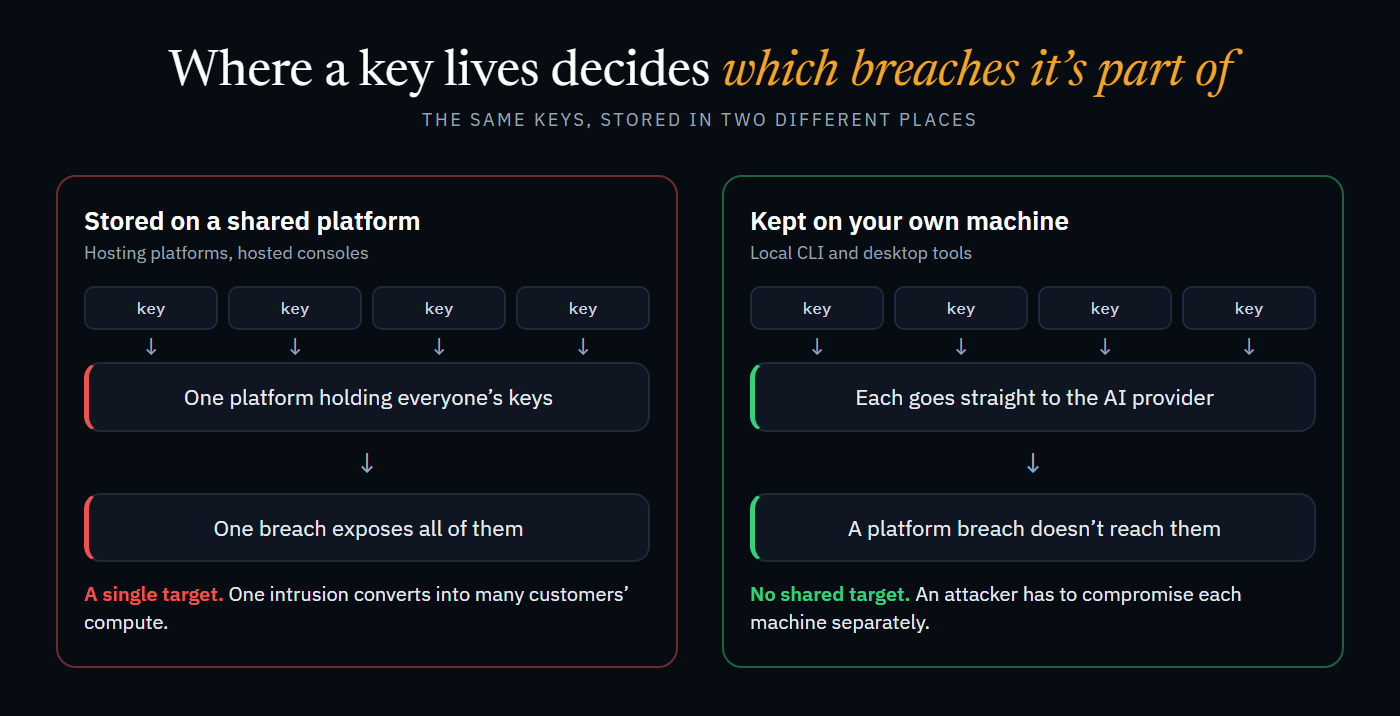
I'm not suggesting the same actor was behind both. Nothing public establishes that, and Railway described its incident as part of "a series of attacks recently targeting platform companies". But the objective is the same, and so is the target selection. Neither attacker was after either platform's own data. They went after the places where many customers' AI keys sit together, because one intrusion converts directly into other people's compute.
The detail from OpenCode that stuck with me: its open-source CLI and desktop app weren't affected, because keys used there never reach OpenCode's servers. Where a key lives decides which breaches it's part of.
Questions I'm still thinking about
I should say where I stand: I like Railway. I still use it, and I recommend it on my kit page, where I have a referral link. This isn't a post about leaving. But the incident left me with questions I haven't fully answered.
What I'd change about the first warning
First, credit where it's due, because Railway got a lot right. Asking vendors to revoke keys proactively was a good call. For some services, it handed over every key it held, not just the ones known to be affected, which probably cut off a lot of abuse before customers even knew. It rotated storage bucket credentials itself, posted status updates at least every 30 minutes, published provider-specific guides, and within two days had sent customers risk-based emails and published a detailed preliminary report. That's a serious response.
The one thing I'd question is the timing of the first warning to customers.
On Tuesday evening, Railway's emails described an issue affecting builds, then said "This incident is now resolved" at 9:56 pm. According to its own report, it had found evidence an hour earlier that the attacker could escalate access at scale. Through Wednesday, the status page talked about investigating issues with builds, the API and the dashboard, with no mention of security. Vendors were asked to revoke keys at 10:25 am. The public disclosure went up at about 11:10 pm.
There are good reasons to wait: confirming what was taken, not tipping off an attacker who may still have access, and not causing panic over a guess. But a short notice saying "we're investigating a possible security incident; consider rotating your AI keys" at the point vendors were told would have given me about eight hours before my spend cap fired. I could have revoked on my own terms, rather than working it out from a usage dashboard. I don't know exactly where that line should be, and Railway had far more information than I did. But from the customer side, I think it was further forward than this.
If I could suggest one change, it would be a "security investigation" notice on the status page, posted the moment vendors are asked to revoke keys. It doesn't need to say what happened. One line would do: "We're investigating a possible security incident. As a precaution, rotate any AI provider keys stored in Railway." It costs little, gives nothing useful to an attacker who already has the keys, and gives customers hours they would otherwise lose.
Would moving providers help?
Railway's disclosure email described this as part of "a series of attacks recently targeting platform companies". Any platform that stores your secrets and decrypts them to run your code is the same kind of target. Moving changes who I'm trusting with my secrets, not whether I'm trusting someone.
So these are the questions I'd ask of any platform, including the one I'm on:
- How does it store and decrypt secrets? Which of its own systems can read them in plain text, and what could an attacker inside its build infrastructure reach?
- Can I avoid long-lived keys altogether? Short-lived credentials issued through workload identity or OIDC leave far less to steal than a static API key sitting in an environment variable.
- Would a separate secrets manager help, or just move the target? It adds access logs and central rotation, but the application still needs the secret at runtime.
- What would I fix regardless of host? Restricting every key, and agreeing in advance where replacements are held. None of those depend on which platform I'm on.
How do you patch fast enough, but not too fast?
This attack came through a platform's build infrastructure, and it's made me look at my own dependency updates differently. Patch too slowly, and a known vulnerability sits open for anyone to use. Patch too quickly, and you can pull in a compromised release before anyone has noticed it's malicious.
I don't have a settled answer. The approach I'm leaning towards is to treat the two differently: fast-track updates that fix a published vulnerability, and let routine updates wait a few days so problems with a new release have time to surface. Pinned versions and reviewed lockfiles mean nothing changes without me seeing it. I'd be interested in how others draw that line.
What I'll take from it
Your secrets are only as safe as the platform holding them. It doesn't matter how carefully you lock down your own environments. Strong passwords, MFA and tightly scoped access don't help if the platform storing your secrets is compromised. None of my accounts showed any sign of a takeover, and my keys were still at risk. Plan for the day your hosting provider has a breach, not just for the day you make a mistake.


Attackers increasingly want AI API keys, as we have seen this week. You can lock down your own service and it won't matter if they take over your provider. Set spend caps, and learn how to rotate keys quickly.
Don't let "rotated" be a single tick box. For each credential, track separately whether the old one is revoked, the new one is saved somewhere safe, it's installed everywhere it's used, and the real feature works. A single "rotated" tick told me only the first.
Decide where replacements live before you need to. Paused deployments left me choosing between rotating everything twice and holding fresh secrets somewhere temporary. An agreed, encrypted holding place, set up in advance, would have made that decision for me.
Know your consumers before you need to. The Railway inventory was quick because the variables could be listed. The harder part is every other place a credential lives, such as a build service that keeps its own copy of your push notification keys. Map those before the night you have to rotate them.
Restrict keys, and know what your logging choices cost. An unrestricted key meant anyone holding it could use it from anywhere, and that's free to fix. Keeping request logging off protected my users' privacy, but it also meant I may never know who used the key. Limited logging is my compromise between the two.
A low cap is a useful alarm. Raising it would have allowed more usage without explaining the usage already there. Instead, it started my investigation hours before the disclosure, and the rotation was under way before I'd read Railway's post. If a hard cap isn't suitable, for example on a service that can't afford to stop, set a spending alert at a low threshold instead. You lose the automatic stop, but you keep the early warning.
When I first looked into it, I was asking why an AI key had reached its cap. By the next morning, I'd replaced almost every credential across my production applications. The public disclosure arrived partway through and gave me context I hadn't had at the start. That's the experience I wanted to document: responding to a warning while the explanation was still emerging, and keeping track of what I actually knew as it changed.
If you're on Railway: what to do now
Railway has published step-by-step security guides for this incident, covering database credentials, buckets, GitHub, and checking usage on specific providers. This is the short version, plus what I learned doing it:
- Rotate every secret stored in Railway, at its provider. Changing the variable in Railway doesn't revoke the old value. Revoke the old credential with whoever issued it.
- Create new Railway API and project tokens. Railway invalidated tokens created before the incident, so anything using the Public API or the CLI with a token needs a new one.
- Check bucket and database credentials. Railway rotated its storage bucket credentials itself. Services pick up the new values only when they're redeployed. Database passwords need changing in the database as well as in the connection settings: Railway has guides for PostgreSQL, MySQL, MongoDB and Redis.
- Reconnect GitHub if deployments fail. Railway rolled its GitHub App installations as part of the response. Its guide covers redeploying buckets and reconnecting GitHub, and there's another for recovering failing deploys.
- Don't forget private registry credentials. If you pull images from a private registry, those credentials were in scope too.
- Review usage on every AI and cloud provider. Look for models, regions or volumes you don't recognise, not just failed sign-ins. Railway has provider-specific guides for OpenAI, Anthropic, OpenRouter, Grok, AWS, GCP, GitHub and Stripe.
- Restrict and cap your AI keys. Limit each key to the APIs it needs, restrict where it can be used from, and set a spend cap with each provider, or a spending alert where a hard cap isn't suitable.
- Verify, don't assume. A healthy deployment doesn't prove sign-in, payments, push notifications or webhooks work. Test the real journeys.
Sources
- Railway, Security disclosure: Wednesday, October 21st
- Railway, Preliminary report: October 21st security incident
- Railway status page, incident updates from 21 to 23 October
- Railway, security guides for the incident
- Railway customer emails received on 21, 22 and 23 October
- TechCrunch, Hackers hit AI coding tool OpenCode, running up charges on users' AI accounts
- BleepingComputer, OpenCode hack exposes API keys amid AI distillation attacks